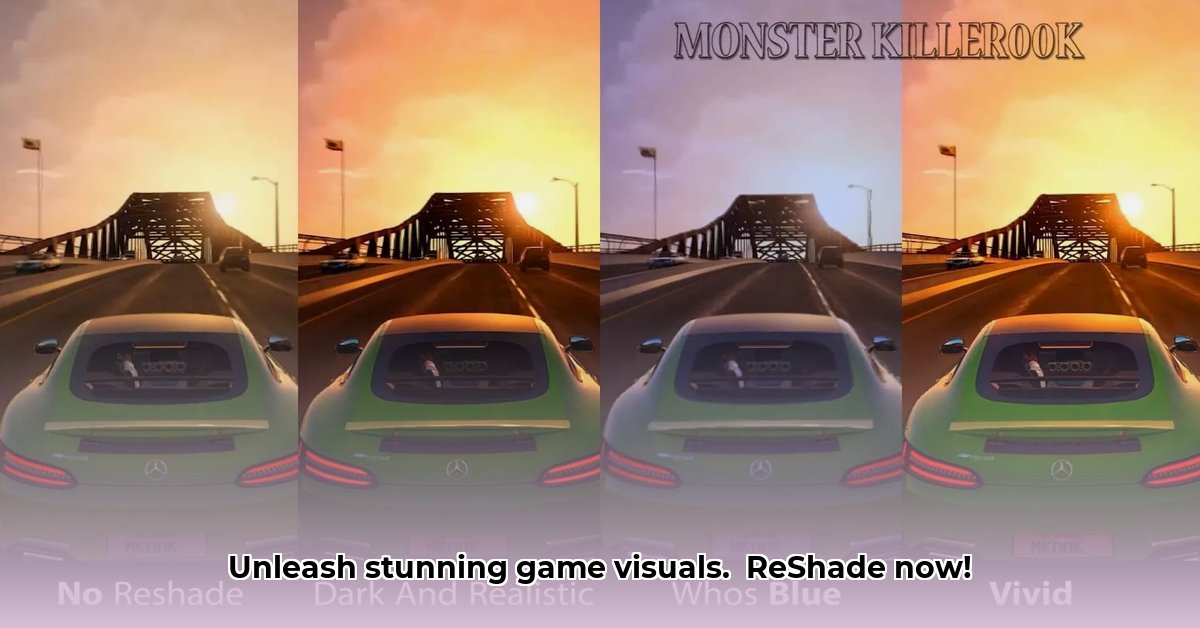
Want to make your games look stunning without buying a new graphics card? ReShade is a free tool that dramatically improves your game's visuals by adding post-processing effects. This guide provides a step-by-step tutorial on how to install, configure, and optimize ReShade for improved graphics, even on lower-end PCs. We'll cover everything from basic installation to advanced customization, addressing common issues and performance considerations along the way.
Understanding ReShade's Core Functionality
ReShade works by adding visual effects after your game renders its image. Think of it as applying a sophisticated filter to your existing graphics. It enhances colors, lighting, shadows, and more, creating a more visually appealing gaming experience. It doesn't modify game files, making installation and removal straightforward. Have you ever wondered how to achieve that cinematic look in your favorite game? ReShade might be the answer.
System Requirements and Game Compatibility
ReShade supports various graphics APIs (DirectX, OpenGL, Vulkan), ensuring broad game compatibility. However, compatibility isn't guaranteed for every game, and some anti-cheat systems may conflict with ReShade. Your system's performance will also factor in; more demanding effects require more processing power. A powerful GPU is beneficial, but optimization techniques make ReShade accessible to a wider range of systems.
Installing and Configuring ReShade: A Step-by-Step Guide
Follow these steps to install and configure ReShade:
Download ReShade: Visit the official ReShade website and download the latest version compatible with your operating system.
Locate Game Executable: Find the
.exefile that launches your game.Run ReShade Installer: Run the downloaded installer and point it to your game's executable.
Select Graphics API: Select the correct API your game uses (DirectX 9, 10, 11, 12, OpenGL, or Vulkan). Incorrect selection may result in the inability to load the tool.
Choose Shaders: ReShade offers various shaders (visual effects). Select those you want to use.
Configure Settings: Adjust the intensity and settings of each shader within ReShade's in-game interface to balance visual enhancements with performance.
Choosing and Using Shaders: Finding Your Perfect Look
Shaders are mini-programs that produce specific visual effects. Popular examples include ambient occlusion (adds realistic shadows), anti-aliasing (smooths jagged edges), depth of field (blurs backgrounds), and color grading (adjusts color palettes). Thousands of shaders are available online; some are packaged as presets offering pre-configured combinations. Did you know that experimenting with different shader combinations can unlock a whole new visual world within your favorite games?
Performance Considerations: Balancing Beauty and Performance
Adding ReShade increases the processing load on your GPU. High-resolution games and complex shaders demand more power, potentially reducing your frames per second (FPS). To optimize:
Start Simple: Begin with a few subtle shaders.
Monitor FPS: Use ReShade's built-in performance monitor or external tools to track your FPS.
Adjust Shader Settings: Tweak individual shader parameters to reduce intensity or quality.
Prioritize Effects: If needed prioritize the effects that are most important, instead of using all the possible enhancements.
Lower In-Game Settings: Reducing in-game graphics settings like shadows or anti-aliasing can free up GPU resources.
Advanced Techniques (Optional)
Experienced users can delve into advanced customization options, tweaking individual shader parameters, and creating custom combinations or even writing their own shaders. This adds an extensive degree of personalization but requires a higher level of technical understanding.
Multiplayer Considerations: Avoiding Bans
ReShade is generally incompatible with many online multiplayer games due to concerns about cheating and unfair advantages. Anti-cheat software often blocks its use, leading to potential account bans. Use it responsibly, and with caution. Always check the game's policies and rules before implementing ReShade.
Conclusion: A Powerful Visual Enhancement Tool
ReShade offers a simple yet powerful way to enhance game graphics. While it requires some initial setup and understanding of potential performance impacts, the visual improvements it provides can significantly enhance the gaming experience. Remember to responsibly manage performance and check for compatibility, especially in multiplayer scenarios.
⭐⭐⭐⭐☆ (4.8)
Download via Link 1
Download via Link 2
Last updated: Tuesday, April 29, 2025